
Session 15: ATL — Aegis TestLab
Date: October 23, 2026
Duration: 81 minutes
Presenters: Siegfried Feng, Jack Lin, Merlin Chen
Guest speaker: Bruce Fu (Customs team)
Host: Aimee Li
Participants: 75+ attendees visible during the live session
Session Recording
📋 Overview
Session 15 opened with good news: Crossroad AI won the Learning & Capability category in Round 2 of the company's AI Awards. Aimee Li thanked every presenter and attendee, and invited everyone to afternoon tea the following Tuesday.
The main talk introduced ATL (Aegis TestLab), a platform from the CargoWise UI team for writing and executing tests. Siegfried Feng, Jack Lin, and Merlin Chen explained that ATL does three things:
- Turns real CargoWise business processes into reusable flows, instead of relying on screen coordinates or fragile selectors.
- Replays recorded steps rather than asking AI to read the screen and decide each click at runtime, so execution is fast, predictable, and cheap.
- Uses AI only where it adds value, for example reading a Work Item (WI), the HLD, and the PR diff to draft test cases that a person must review and approve.
Bruce Fu then shared his first-hand experience using ATL on the Customs team, followed by a long, lively Q&A.
Slides and the tool UI shown in the recording are partly in Chinese. The captions on this page describe them in English.
🎯 Key Topics Covered
1. Good News: AI Awards Round 2
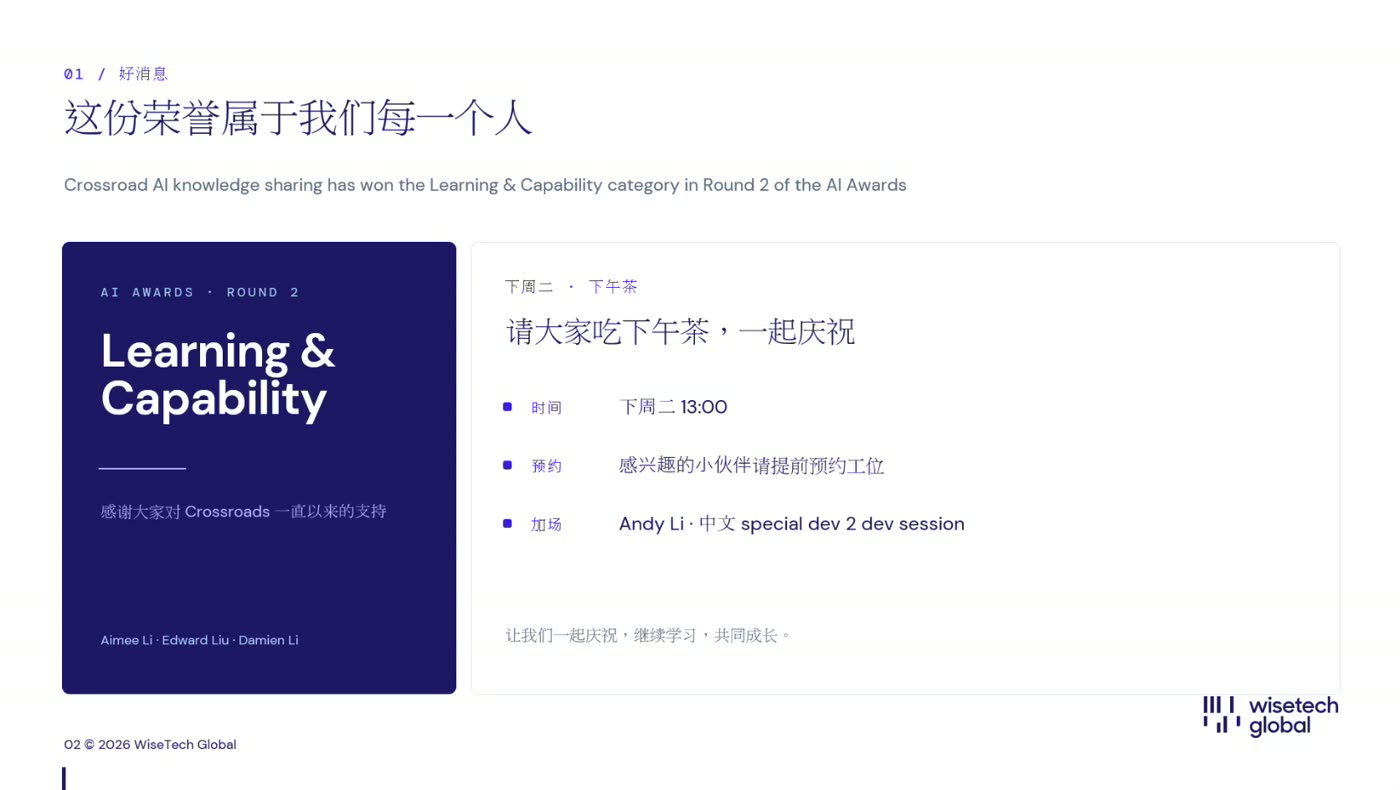
Aimee Li announced that Crossroad AI knowledge sharing won the Learning & Capability category and credited everyone who stood up to share, turned up on time, and asked questions. The team plans to keep learning and sharing, and to show the company that the Nanjing office keeps moving forward.
2. Why ATL? Augmentation, Not Automation
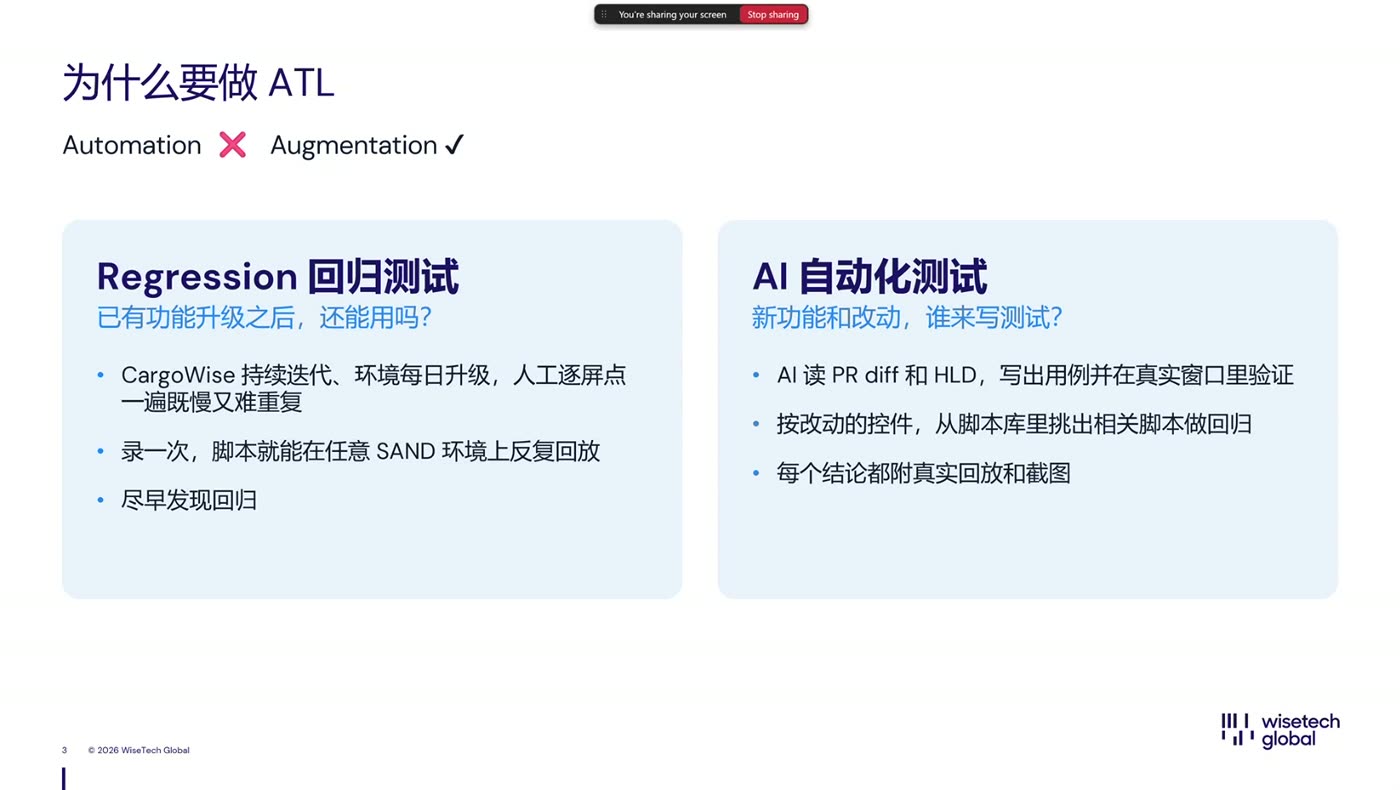
Jack Lin explained that ATL is not meant to replace testers. It augments testing that already exists:
- Testing from scratch needs a lot of context: what the feature is for, how it is used, and how to test it.
- Incremental testing needs enough existing tests. To test something on a node tab, you must first open the module, and to open the module you must search for it on the home page. Many testers repeat those same early steps.
- ATL extracts the repeated steps into a flow, like a template. If someone has already done a similar operation, the next person re-runs it instead of paying the cost again.
The slide framed two use cases:
| Regression testing | AI test cases | |
|---|---|---|
| Question | Features exist and the environment is upgraded daily; do they still work? | New features and changes; who writes the tests? |
| Approach | Record once, replay many times on any SAND environment | AI reads the PR diff and HLD, drafts cases, and verifies them on a real window |
| Result | Catch regressions early | Every conclusion comes with replayable evidence and screenshots |
3. Demo: Record → Replay → Report
A short video showed the end-to-end loop:
- Record: perform a real business flow by hand in a SAND environment, adding expected-result checks as you go. A small floating window shows that recording is active.
- Replay: ATL saves the recording as JSON and re-runs it on SAND in one click, showing each step as passed or failed. JSON is used because ATL must drive both the browser and WinForms.
- Report: the run ends with a report that shows every step and screenshot, in the layout product teams are used to.
You can start a run from a Work Item number, a SAND address, or a test name; ATL finds and opens the matching deployed instance.
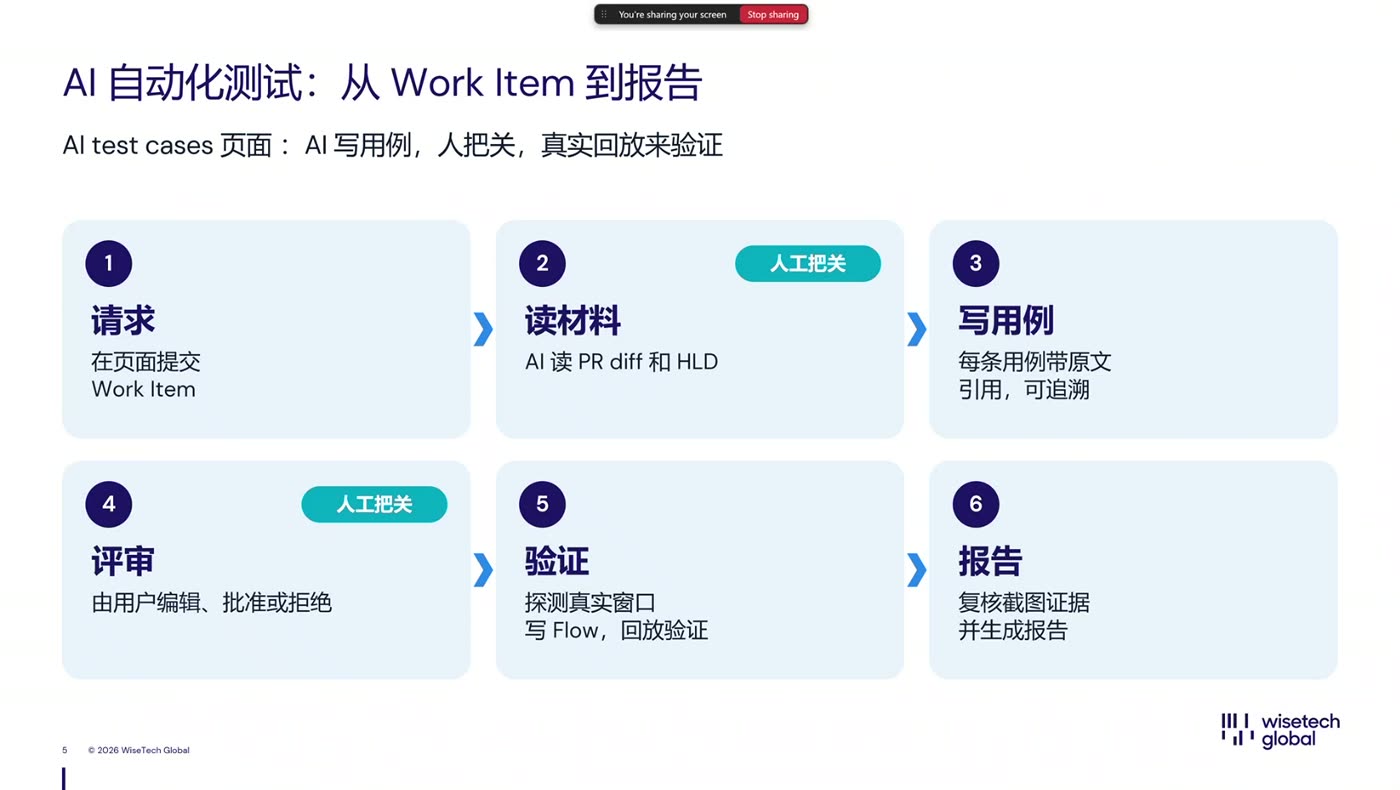
4. From Work Item to Report: A Six-Step AI Pipeline
The slide above also shows the AI path. Two of the six steps are deliberately human:
| Step | What happens |
|---|---|
| 1. Request | Submit a Work Item on the page |
| 2. Read sources 👤 | AI reads the PR diff and HLD; a person confirms or corrects the sources |
| 3. Write cases | AI drafts cases, each quoting the original text it is based on |
| 4. Review 👤 | The user edits, approves, or rejects each case |
| 5. Verify | AI probes the real window, writes the flow, and replays it |
| 6. Report | A report with evidence and screenshots is produced |
5. How the Report Evolved, and Why
Siegfried Feng walked through four generations of the test report, each fixing a problem someone raised:
- Version 1: six steps and "passed". Too little to believe. They then told the AI not to reuse existing data and to give more steps.
- Version 2: far more steps. Starting from switching branch, creating a Shipment from scratch, and filling in data. A reviewer asked how to trust 300 AI-generated cases for one WI.
- Version 3: traceability. Every case lists its scenario and why it was generated, with the original WI text, the HLD text, and the relevant code. The report also records which HLD version and which PR commit it corresponds to. Someone outside the module can follow the steps and screenshots and reproduce the result.
- Version 4: readability. Reviewers said the reports were too long. The report now shows only key steps by default. For many cases, an experienced person only needs to look at the final screenshot, but they can expand to the full steps from the very first one.
Later additions:
- A side navigation bar for quick scrolling.
- A review feature: reviewers can leave their name, save a copy, and send the report to product. Robot-made and human-made results carry different icons.
- Per-step comments, highlighted on the right of the report.
- A conclusion section listing what passed, what failed and why, what was deliberately not tested, shared configuration, and the test data that was left behind.
- Restore steps: for example, if a test changed a packline layout or ticked a registry setting, the test restores it afterwards.
Real examples
- UXML import/export: a report of about 138 steps and 40 images that modifies the registry, creates data and packlines, exports a file, and imports it back. Support for importing and exporting UXML files was added just before the session.
- Cross-platform test: a report for the Carbon team that creates data in CargoWise, attaches it to a Consol, and continues on the Leo platform. Cross-platform support was also added recently.
6. Platform Tour
Merlin Chen showed the web front end, which has three main areas.
Tests (regression)
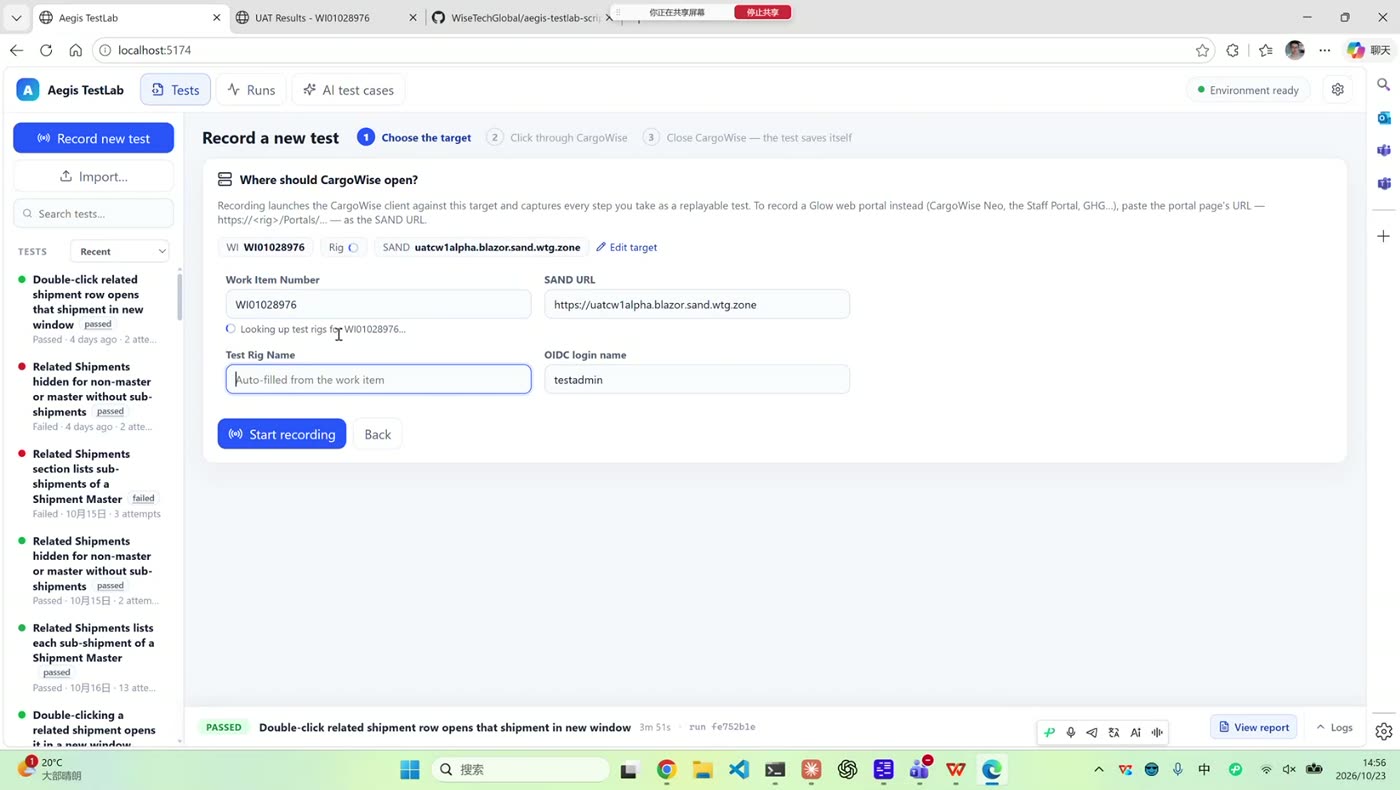
Click Record new test, enter a WI number or SAND address and a test rig name (a dialog lets you choose if there are several rigs), and ATL opens SAND and records every step. You can rerun them later to re-verify what you tested before. This page uses zero AI tokens. ATL logs in for you, supports OIDC and Support login, and runs in the background without stealing keyboard focus, so you can keep working.
AI test cases
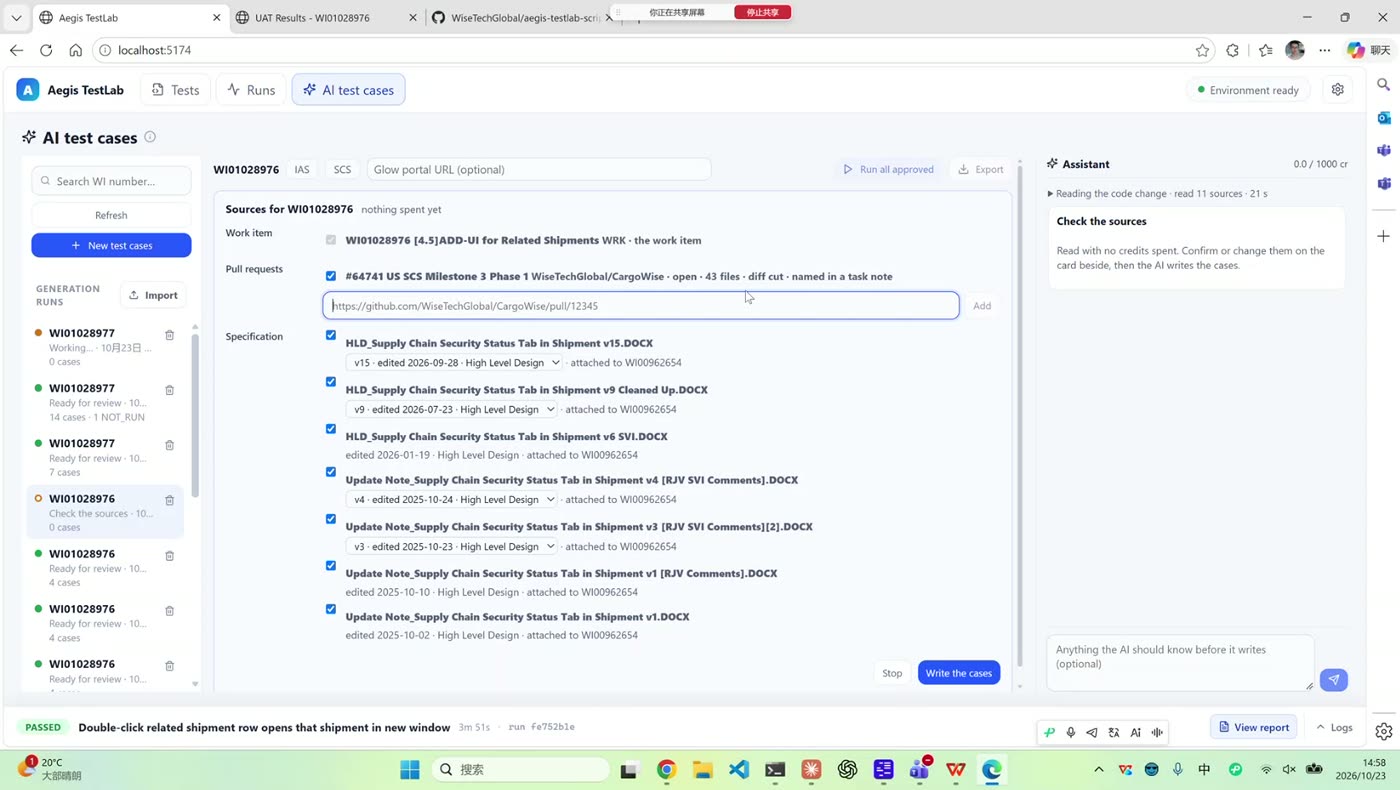
Enter a WI number and ATL checks that it has everything it needs: login, ediProd and GitHub access, the WI, the HLD in eDocs, the PR, reference scripts, and a SAND rig. You then choose the sources:
- Pick or add PRs, including unmerged prerequisite PRs from the same project.
- Pick an HLD version. The product team uploads a new HLD version instead of overwriting, so a WI may have V1 through V15.
- Add extra instructions in the chat box.
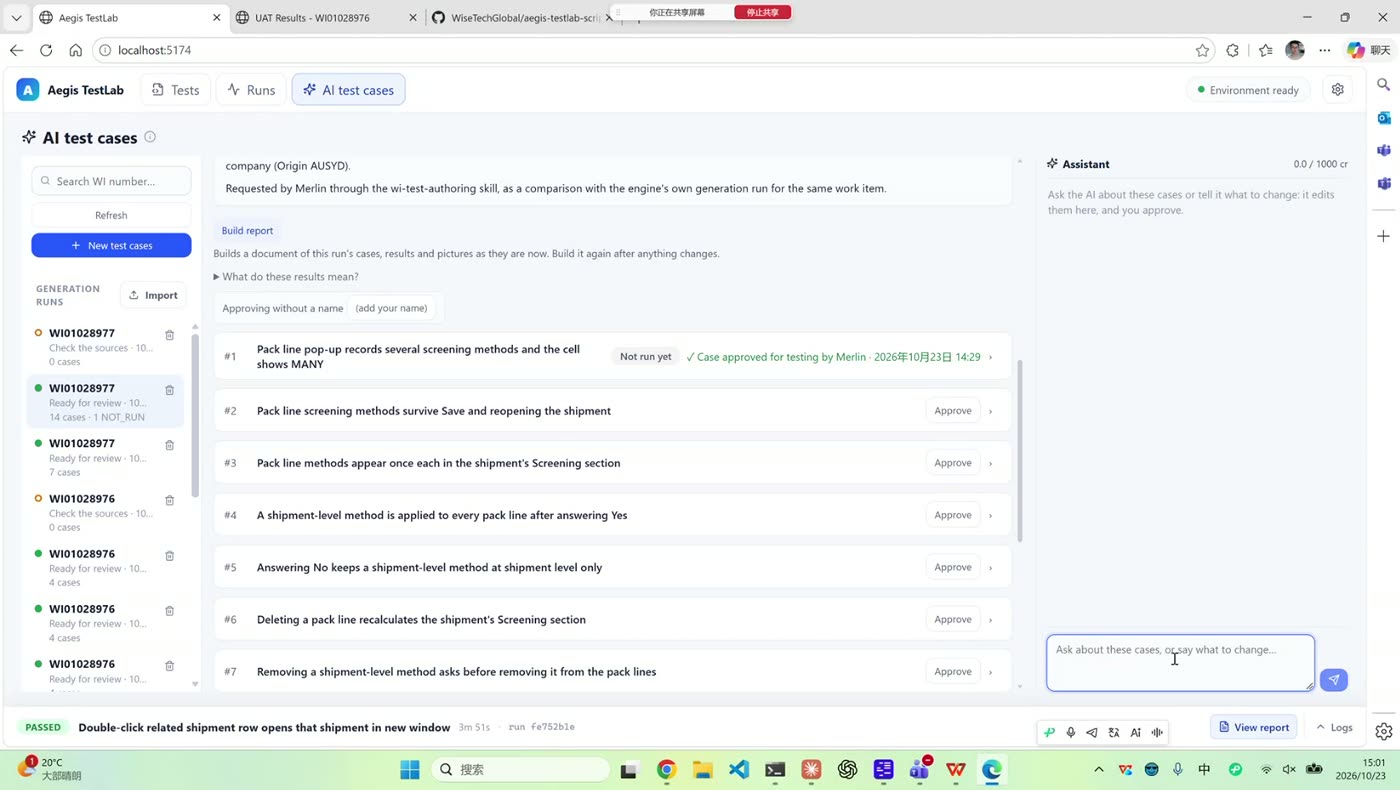
The page then lists the generated cases (14 for the example WI). Each case shows what it will do, why each step is there, the expected result, and the evidence behind it, such as the WI sentence, the HLD sentence, and the code line. You can approve cases individually or all at once, ask the chat assistant to explain, change, or add cases, and then click Run with AI.
Merlin stressed the principle behind approval: AI is an aid, and a person must take responsibility for the output. A passing AI test never means the feature is fine.
The same workflow also works from VS Code through a skill; the web page is a friendlier front end because product teams use it too.
7. Why Reference Scripts Matter
ATL has no data-management layer yet, so the AI does not inherently know which organisation, origin, or destination to use or how to answer a business dialog. Existing scripts supply that knowledge. They act much like prompts do.
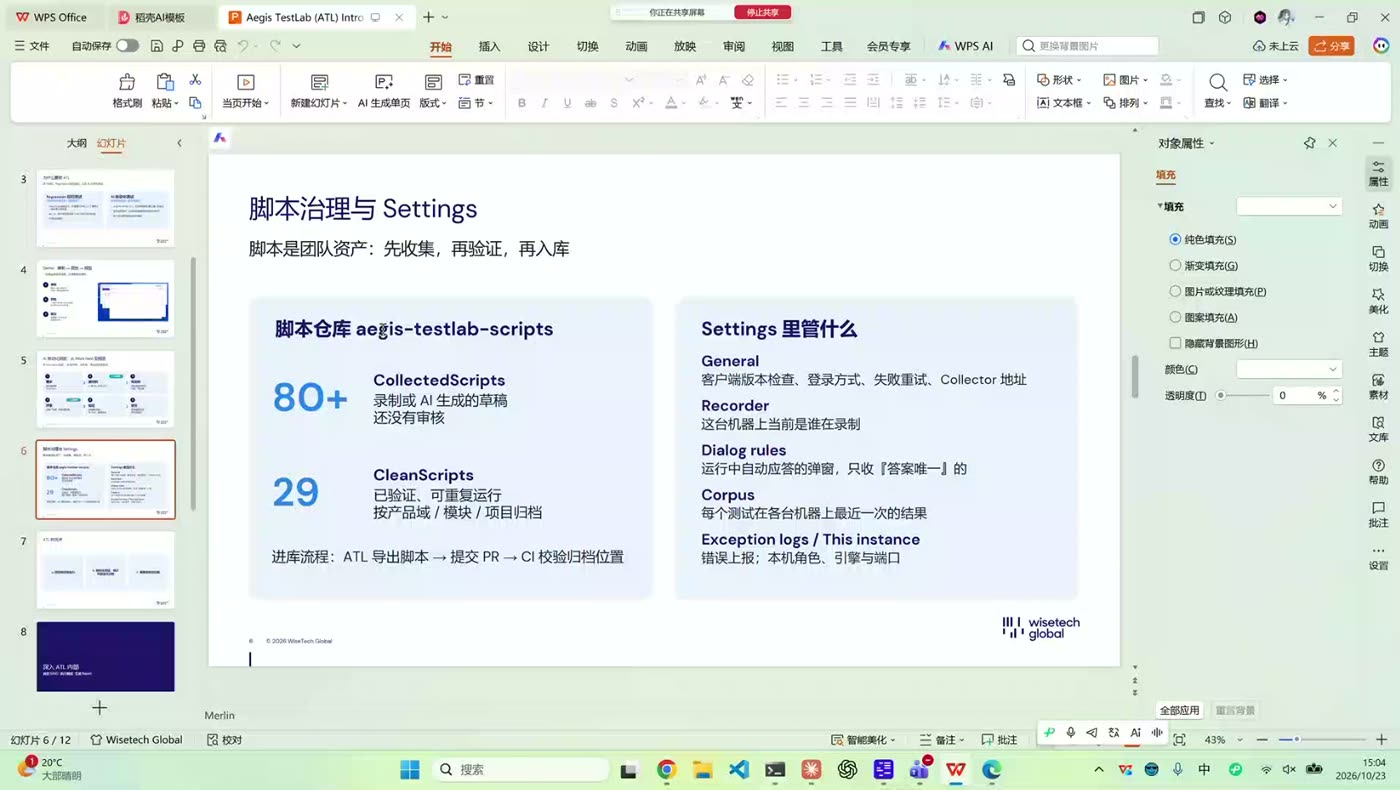
The scripts live in an aegis-testlab-scripts repository in two tiers:
| Tier | Count on slide | Meaning |
|---|---|---|
| Collected scripts | 80+ | Recorded or AI-generated drafts that have not been reviewed. Uploaded automatically whether the run succeeded or failed, so they may not replay cleanly. |
| Clean scripts | 29 | Verified, repeatable scripts organised by product area, module, or project, with their own data. |
The route into the repository is: ATL exports the script, a PR is submitted, and CI validates and files it. When AI writes a new case, it pulls the closest collected and clean scripts by project, module, area, or WI similarity.
8. Settings and Dialog Rules
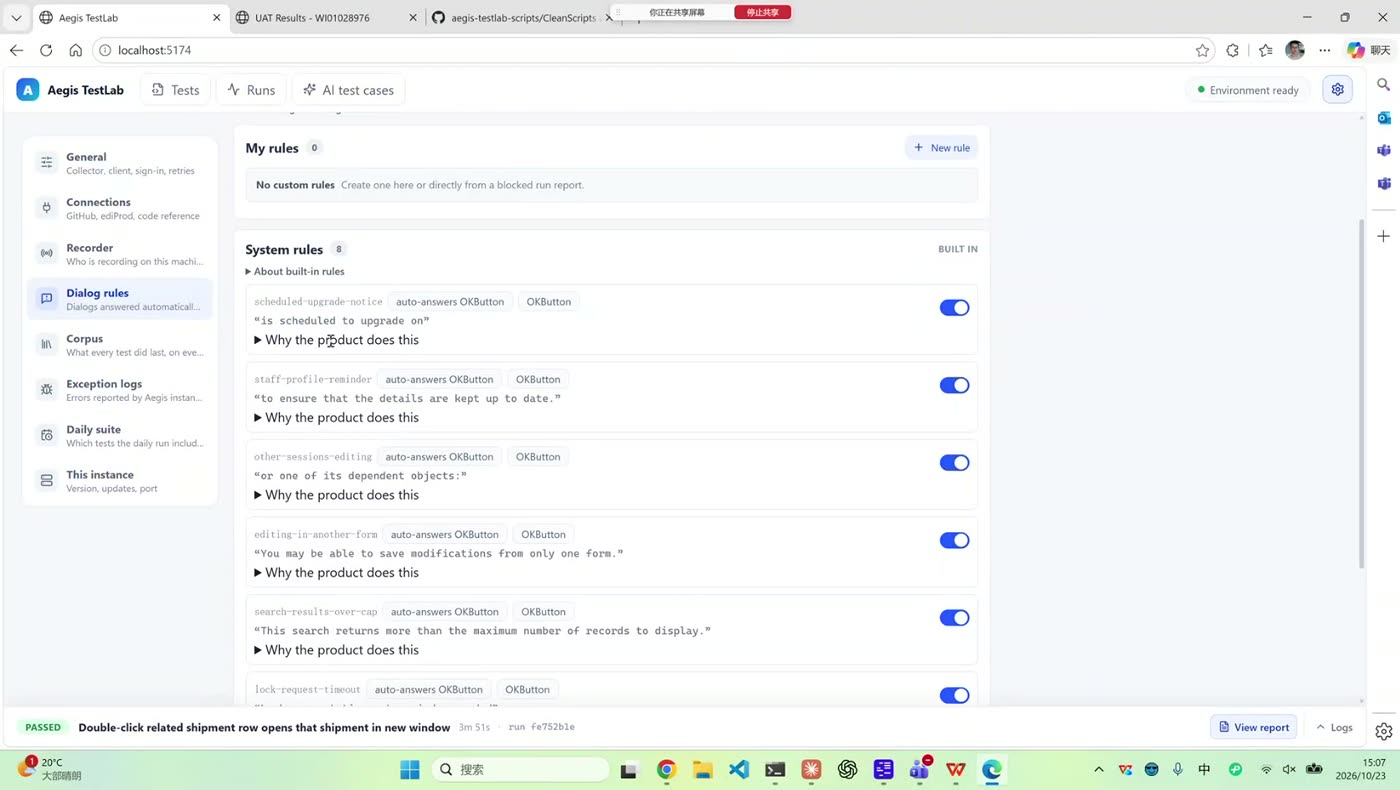
Merlin also toured the settings page:
- Client version check: SAND needs a local CargoWise client at the same or a newer version. Leaving the check on can uninstall and reinstall the client, which is slow, so you can turn it off when developing locally.
- Sign-in method: Microsoft OIDC or a Support certificate, plus automatic retries.
- Dialog rules: built-in rules automatically answer system noise, such as the six-monthly staff-profile reminder. They are not recorded and not replayed. You can add custom rules when your test scenario needs a dialog answered a specific way.
- Corpus, collector, and logs: where collected scripts are synced, the latest result per test, and error reporting.
9. Inside ATL
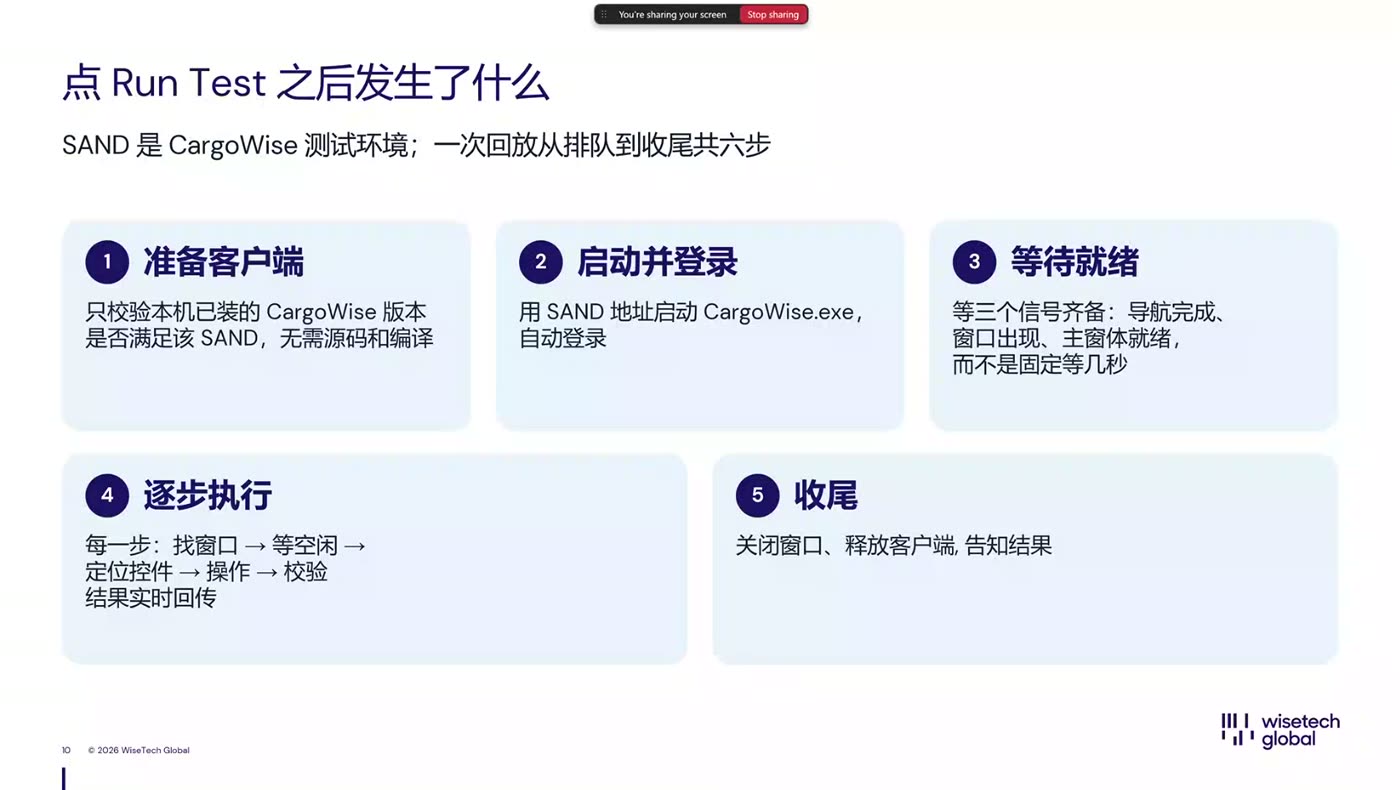
Jack Lin described the five stages of a run:
- Prepare the client: check the installed CargoWise client version against SAND (no source build required).
- Launch and log in: start CargoWise from the SAND address and sign in automatically.
- Wait until ready: three signals must align, namely navigation finished, window shown, and main form idle, rather than a fixed delay.
- Execute step by step: find window → wait until idle → locate control → act → verify, with live results.
- Wrap up: close the window, release the client, and report the result.
The stack is Web UI → API → cw-client → CargoWise SAND (WebView2), and recording and running share the same start-up path.
The team also refactored element location. Instead of XY coordinates, XPath, or CSS selectors, ATL uses a full ancestor chain with its own markup so that every element gets a unique locator. Moving a control does not break a script.
10. Future Plans
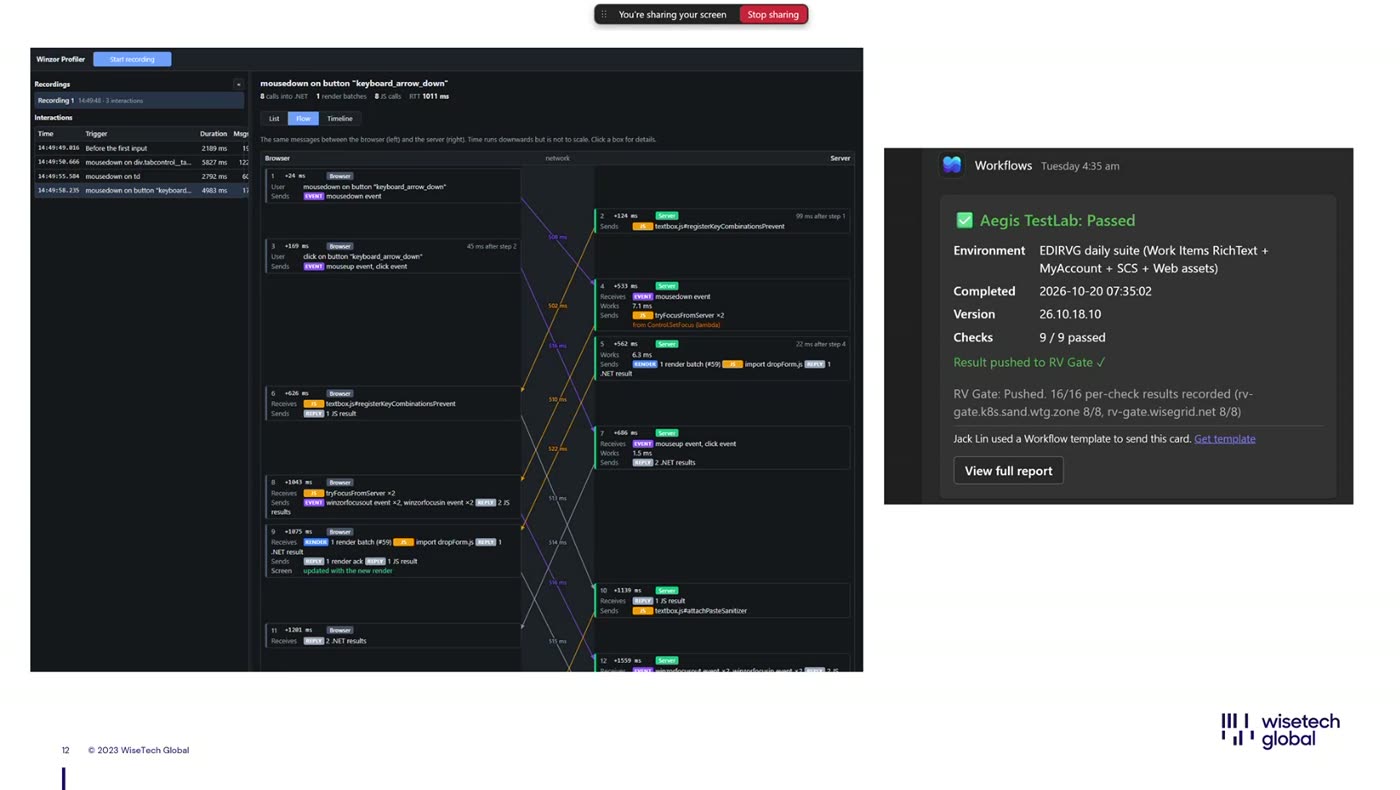
- RV Gate: run the same checks against each version and block the ediProd upgrade if a version has a problem. It already pushes daily results to Teams.
- Product-team flows: turn what the product team does into flows that can keep re-running.
- Test coverage: only a few teams use ATL today, so broad coverage will take time.
- Web verification: an external validation path.
- Performance analysis: another tool in the team traces the whole code path from UI to back end. It can be combined with ATL's automation to keep analysing the same flow.
Jack added that ATL may not suit every team's habits, so each team should extend it to match its own way of working. He would also like to package the core so others can build on it.
11. User Story: Bruce Fu on Customs Testing
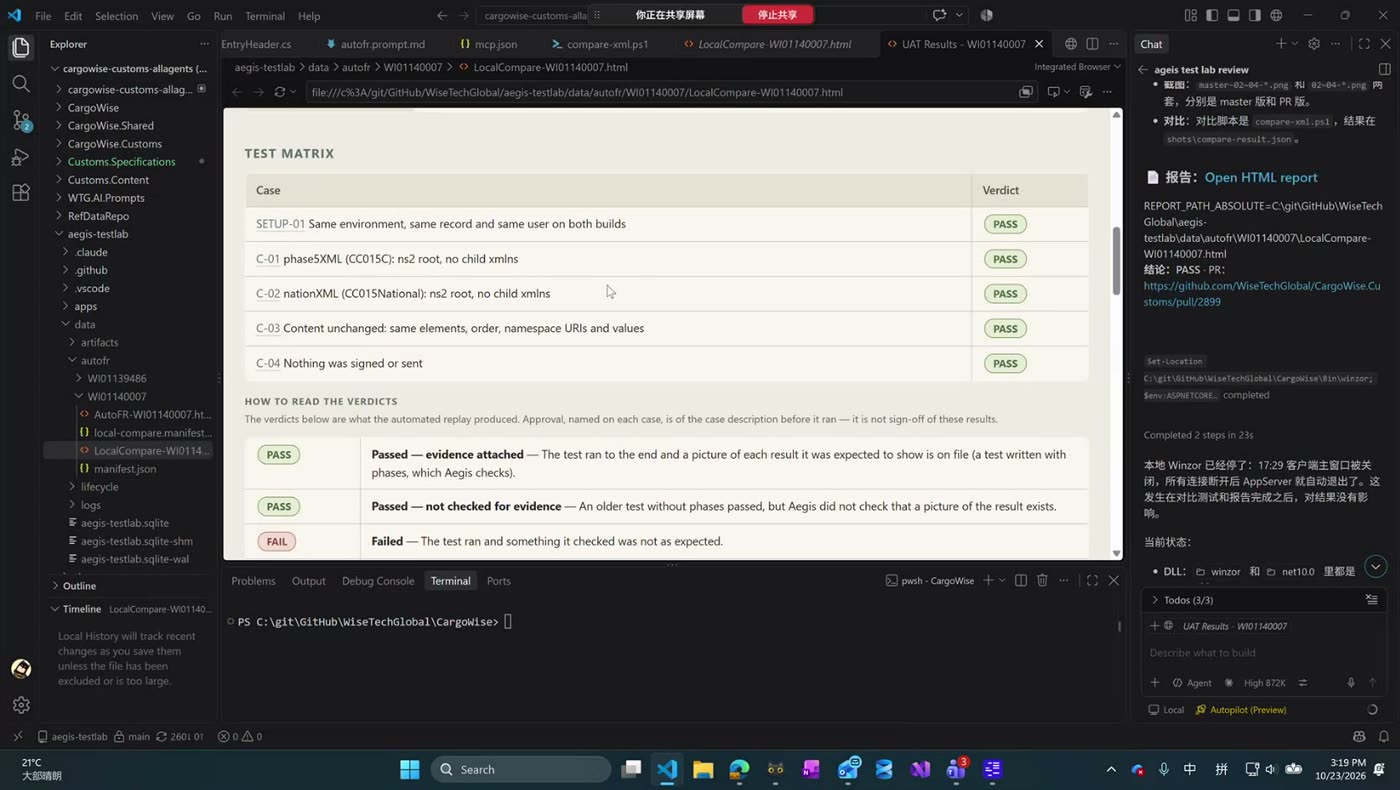
Bruce Fu from the Customs team tried ATL on message sending and receiving, a common but time-consuming scenario. A single functional test means sending or receiving a message, running SQL scripts and service tasks, and comparing the message payload before and after a code change. Repeating this for each code iteration, and sometimes connecting to cloud instance databases when PMs cannot create the right data, takes a long time.
After asking Jack whether ATL supported SQL scripts, service tasks, and SAND or Corp instances (it does), Bruce tried it the same day:
- Getting started: install through Copilot and use the
/autofrcommand with a request. It reported within about 3 minutes that he had no test rig. On local Winzor it ran in about 2 minutes and stopped at the Customs-specific send step, which needed a staff account he created himself. The whole first run took under an hour and produced a ready-to-use report with screenshots and message comparisons. - Second WI: with
/autofrplus his PR, ATL spent 53 minutes working through the four spec requirements and produced a functional test document. It ran entirely in the background. - A bonus: a local environment problem made his NCTS module disappear. ATL got around it while he fixed the environment manually, which he estimated saved at least half an hour. He checked the results against his spec and found them correct.
Bruce said he expects ATL to improve local testing efficiency, especially when historical test documents need environment-specific adjustments.
💬 Q&A Highlights
Q (Zorn Xu): If CargoWise UI or workflows change often, how do you maintain reference scripts? Can they be parameterised, or must they be re-recorded? And can ATL detect which of 1,000 scripts are broken?
A (Siegfried Feng, Jack Lin): AI is good at fixing outdated scripts: tell it a script may be stale, give it related PRs or HLDs, or nothing, and let it re-run. It saves effort even if not time. Automatic detection at the scale of hundreds of workflows has not been designed yet, because the repository has only around 100 scripts. A scheduled online run is a future option. Jack said clean scripts should be small, atomic flows that can be assembled, with a stable layer for things that rarely change and a separate layer for the parts that change often.
Q (Edward Liu): After recording, can I edit the steps or pause while recording?
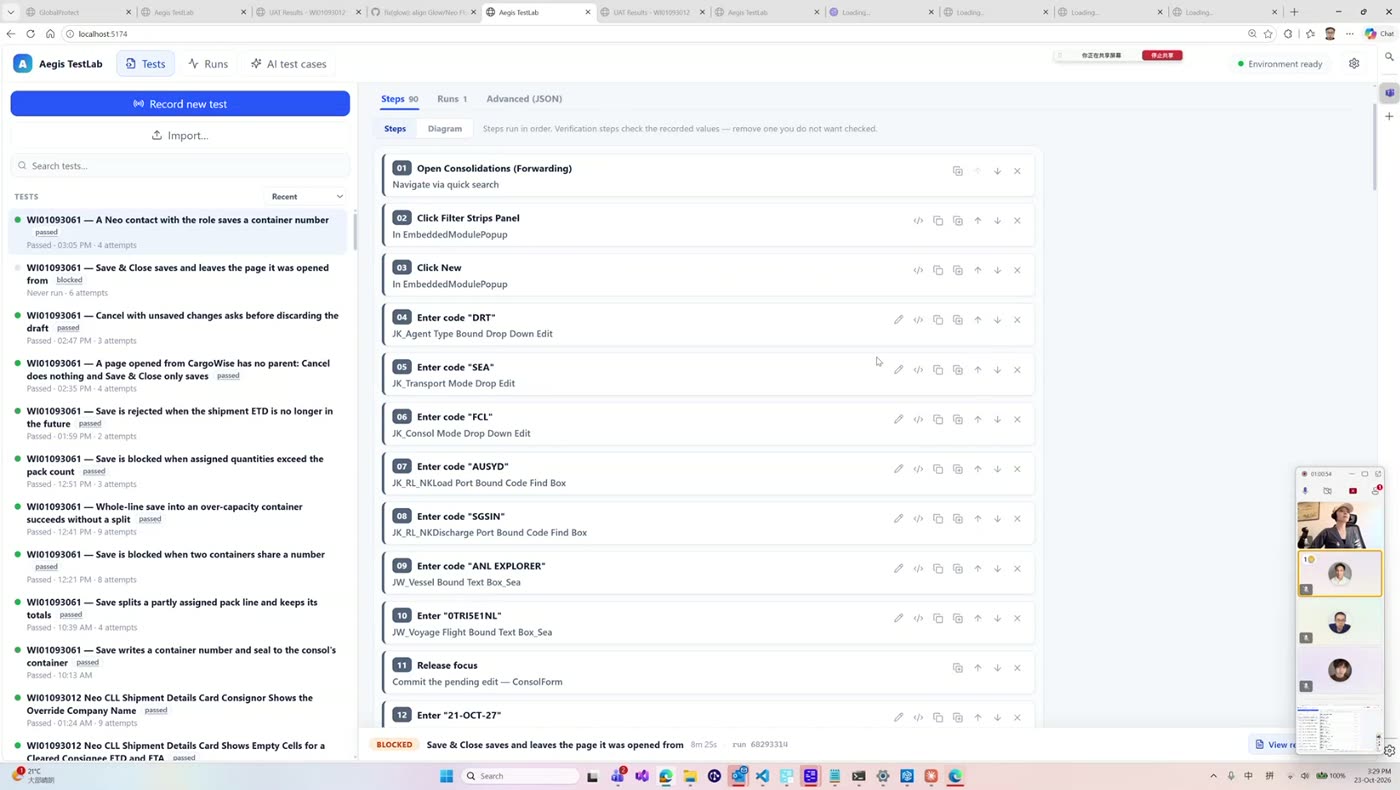
A (Siegfried Feng): Yes. Each step can be edited, copied, added, moved up or down, or deleted with the X, and the details of its control tree can be expanded. For larger corrections, pause, do the other work, and restart recording.
Q (Jay Wang): The Customs demo ran through a skill. Doesn't it still need AI and tokens? Are scripts effectively prompts?
A (Jack Lin): Yes, the skill is a simpler entry point for people who prefer not to click through the UI; the underlying engine is the same. Scripts act much like prompts. Reusing an existing flow costs little or no tokens, but it is not strictly zero when a new scenario has no prior script.
Q (Allen Shen): Must recording and replay use the same environment and database? And how does ATL verify that the UI changed?
A (Siegfried Feng): Not unless the scenario depends on specific organisations, countries, or numbers; otherwise a script can run on any SAND. For verification, ATL relies on assertions: when a field is asserted, it temporarily injects a style into the DOM to draw a blue box around it and takes a screenshot, so a reviewer spots it quickly. Popups, tooltips, and many field types are supported. Because locators use the element tree rather than screen position, a moved control still works.
Q (Peter): Does it support database verification?
A: This was answered in the chat during the session and is not captured in the recording.
Q (Rick): For a new scenario with no examples, how accurate and fast is the AI?
A (Siegfried Feng): The first exploration can take a while. For a Ukraine case from another team, whose business had never used the Leo platform, the AI explored the first case 28 times, then needed far less iteration in later cases. Starting from scratch is no problem.
Q (Mason): Which interfaces can be tested besides CargoWise?
A (Siegfried Feng): Leo and Glow, including CargoWise-to-Leo flows. Uploading and downloading files works. Documents are not supported yet, because a document's DOM can be more than ten times larger than a normal form. Teams with other scenarios should post them in the group chat.
Q (Aimee Li): What were the hardest problems?
A:
- Jack Lin: Login, especially OIDC, took about three months. The second problem is how to trust AI output: the final confirmation must be a person who understands what is being tested. Each team should extend the tool to its own habits.
- Siegfried Feng: Many scenarios were unsupported. For tooltips, users now click an assert button first to tell ATL they are about to assert the whole box rather than click it. The web SAND has a web top and a WinForms bottom, so some controls and small parent-less popups are invisible to the recorder. The AI also tends to cut corners, so the team added restrictions and kept improving the report.
- Merlin Chen: If you build a tool and promote it, you must be product, design, and development at once. Reviewing what AI did is essential, but your own satisfaction is not enough. User feedback is what is missing, so please give it actively.
Q/Suggestion (Jay Wang): The reports are detailed and in English; can they be switched to Chinese?
A (Merlin Chen, Jack Lin, Siegfried Feng): A language switch is easy to add, but translating the report costs tokens, so for now, download the report and ask AI to translate it only when needed. Users can also add their own requirements and local notes (for example HLDs stored locally) to a run, and settings include a memory-like custom instruction, such as telling the AI that the data in a test rig is all test data. Ben Hao added that translation is cheap: a small model can translate a page for very few tokens, and he built a document-view skill that translates through Copilot and saves the result locally.
Q (Rick, Ben Hao): Can ATL be deployed as a web service like DAT?
A (David Dai): The team deliberately started locally, because asking for a large server first would be less persuasive. The core of the project is the scripts, which can still be collected centrally. If it becomes a common need, they will consider moving toward DAT.
📊 Presentations & Materials
Session Recording
🎥 Watch the October 23, 2026 recording
The slide deck was not supplied separately. The slide and tool images on this page were captured from the recording.
Recording highlights:
- AI Awards announcement and host remarks
- Why ATL, and the record → replay → report demo
- The six-step Work Item to report pipeline and four generations of the report
- Live platform tour: tests, AI test cases, approval, and settings
- ATL internals, RV Gate, and future plans
- Bruce Fu's Customs team experience
- An extended Q&A on script maintenance, assertions, environments, languages, and hosting
🔗 Featured Resources
No external links were shared during the session. ATL is an internal WiseTech tool; contact the presenters (Siegfried Feng, Jack Lin, Merlin Chen) or use the group chat to try it or give feedback.
🎮 Quiz Activity
No quiz activity was included in this session's recording. After the talk, the host led an extended Q&A.
🏆 Quiz Results & Winners
| Status | Details |
|---|---|
| No quiz held | The recording did not include a quiz or winner announcement. |
🔑 Key Insights
- Replay is cheap, AI is for authoring: record once and replay with no tokens; spend tokens only to draft and verify new cases.
- Humans stay accountable: AI-generated cases must be reviewed and approved, and every case shows the WI, HLD, and code lines it came from.
- A report must be both reliable and readable: show key steps by default, and make the full steps one click away.
- Reference scripts are the AI's memory of how we test: good data, dialog handling, and business context come from reusing them.
- Locate elements by structure, not coordinates: an ancestor chain with unique locators survives UI changes.
- Keep scripts small and layered: atomic flows with a stable layer are easier to maintain and reassemble.
- Each team should adapt the tool: habits differ, and user feedback is the missing ingredient.
📚 Further Learning
For Developers
- Record a regression test for a flow you test often, and replay it on a different SAND environment.
- Use the AI test cases page on a recent WI, and review the sources and HLD version it picked before approving cases.
- Add the data and dialog answers your area needs as reference scripts.
For Teams
- Collect clean, atomic scripts for your module rather than long end-to-end ones.
- Send ATL feedback and unsupported scenarios to the presenters in the group chat.
- Decide who reviews and signs off AI-generated reports in your team.
📣 Announcements
- AI Awards: Crossroad AI won the Learning & Capability category in Round 2.
- Next Tuesday at 1 PM: extra afternoon tea, together with Andy Li's Chinese special dev-to-dev session. Remember to book a desk.
- Time recording: the host posted the time recording Work Item in the chat for attendees to log their time.
🙏 Acknowledgments
Special thanks to:
- Siegfried Feng, Jack Lin, and Merlin Chen for presenting ATL
- Bruce Fu for sharing his real-world Customs testing experience
- David Dai and Ben Hao for their answers and additions
- Aimee Li for hosting and facilitating the session
- Zorn Xu, Edward Liu, Jay Wang, Allen Shen, Peter, Rick, and Mason for their questions
- All participants for joining and supporting Crossroad AI
AI proposes, people approve
Let AI draft the test cases, but let a person who understands the feature approve them and sign off on the result.
Feedback shapes the tool
ATL's reports, languages, and supported scenarios will change with user feedback. If something is missing for your team, tell the presenters.
Session 15 | October 23, 2026 | ATL: Aegis TestLab | Siegfried Feng, Jack Lin, Merlin Chen