
Session 11: Dev-Workspaces — Focus on the Problem, Not the Process
Date: May 8, 2026
Duration: 59 minutes
Presenter: Andy Li
Participants: 120+ attendees visible during the live session
Session Recording
📋 Overview
Session 11 introduced Dev-Workspaces, a developer-centric automation layer for WiseTech workflows. Andy Li demonstrated how natural-language requests can activate known, script-backed workflows while durable workspace state keeps each work item resumable across chats, tools, repositories, and long-running validation processes.
The central principle was simple: focus on the problem, not the process. Branch creation, QGL, database upgrades, solution setup, local testing, Crikey checks, DAT submissions, sandbox URLs, and review-document generation are necessary mechanics, but they should not consume the attention needed for engineering decisions. Dev-Workspaces moves those repetitive steps into repeatable workflows while keeping design, trade-offs, implementation, and validation under human control.
🎯 Key Topics Covered
1. The Cost of Repetitive Workflow Mechanics
A typical work item begins with a long sequence of setup and coordination tasks: create a Git branch, run QGL, upgrade a database, create or resume a worktree, open multiple Visual Studio solutions, and sometimes launch Visual Studio only to run tests. Later stages add local CargoWise testing, review fixes, Crikey checks, Winzor testing, DAT submission, sandbox discovery, UAT launch, and functional-review documents.
None of these steps is the business problem itself, yet each consumes attention and introduces opportunities for inconsistency. Dev-Workspaces treats these mechanics as an automation surface so developers can spend more time understanding and solving the actual problem.
2. Human Judgment Stays in the Loop
The session did not frame automation as a replacement for engineering judgment. Its purpose is to move routine coordination while leaving consequential decisions with the developer.
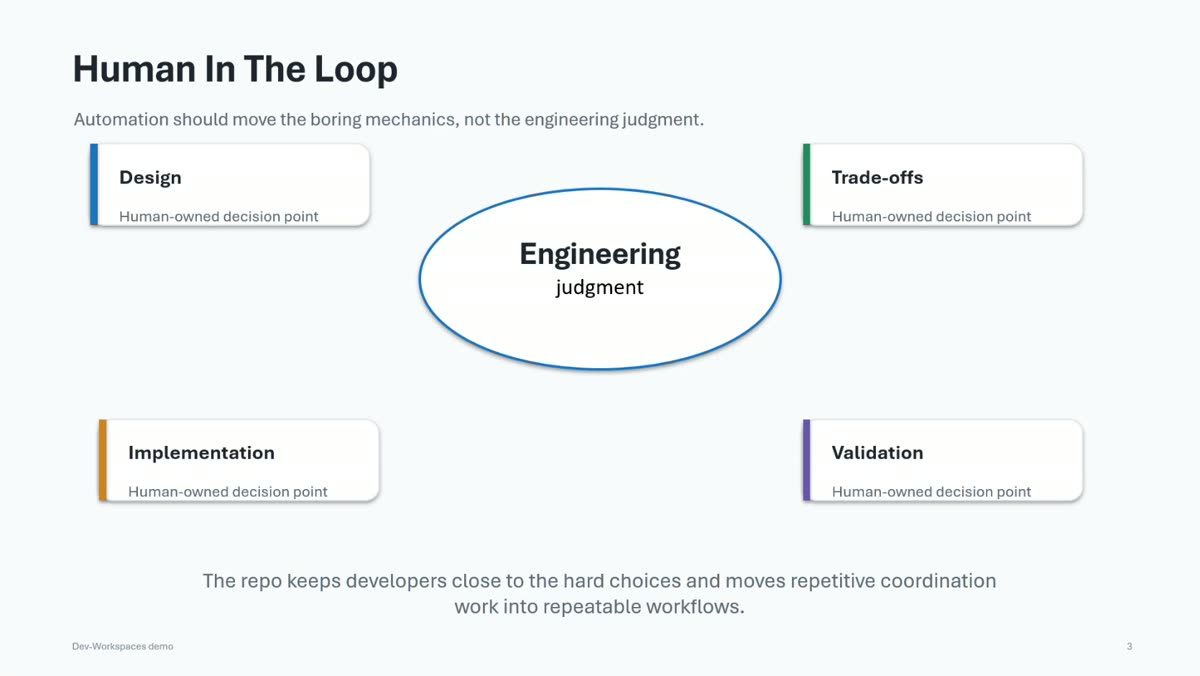
Human-owned decision points include:
- understanding the design and intended outcome;
- evaluating implementation trade-offs;
- choosing and reviewing the implementation;
- validating behavior and deciding whether the result is acceptable.
The repository keeps developers close to these hard choices and makes the surrounding process repeatable and inspectable.
3. Prompts Backed by Known Workflows
Dev-Workspaces combines natural-language prompts with scripts, Skills, and durable workspace state. A command such as Resume WI01035223 should activate a known workflow rather than create a one-off improvisation.
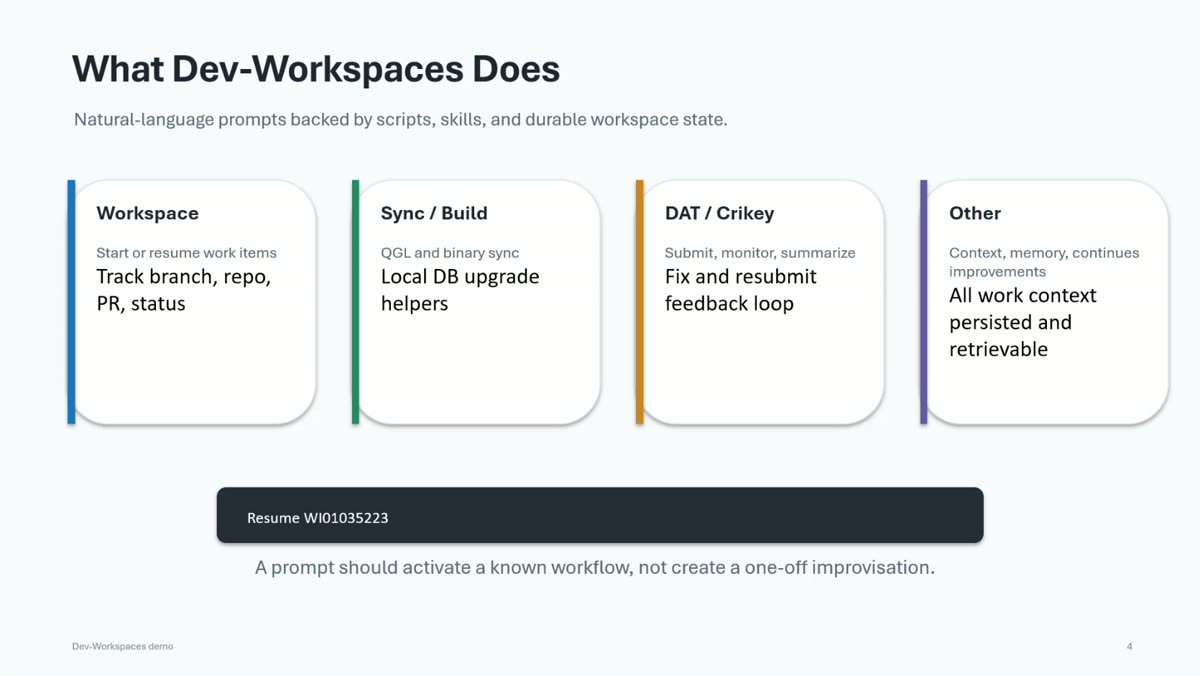
| Area | Capabilities demonstrated |
|---|---|
| Workspace | Start or resume work items; track branch, repository, PR, and status |
| Sync / Build | Run QGL and binary synchronization; assist with local database upgrades |
| DAT / Crikey | Submit, monitor, summarize, fix, and resubmit through a feedback loop |
| Context | Persist work-item context, memory, progress, and improvements for later retrieval |
The instructions remain deliberately small and precise. Deterministic scripts handle repeatable operations, while Skills describe when and how the agent should compose them.
4. Durable Work-Item State
Each work item receives a workspace and a persistent ReadMe.md. The demonstrated workspace recorded the done statement, current status, next action, progress log, branch and worktree information, and context retrieved from the source work item.
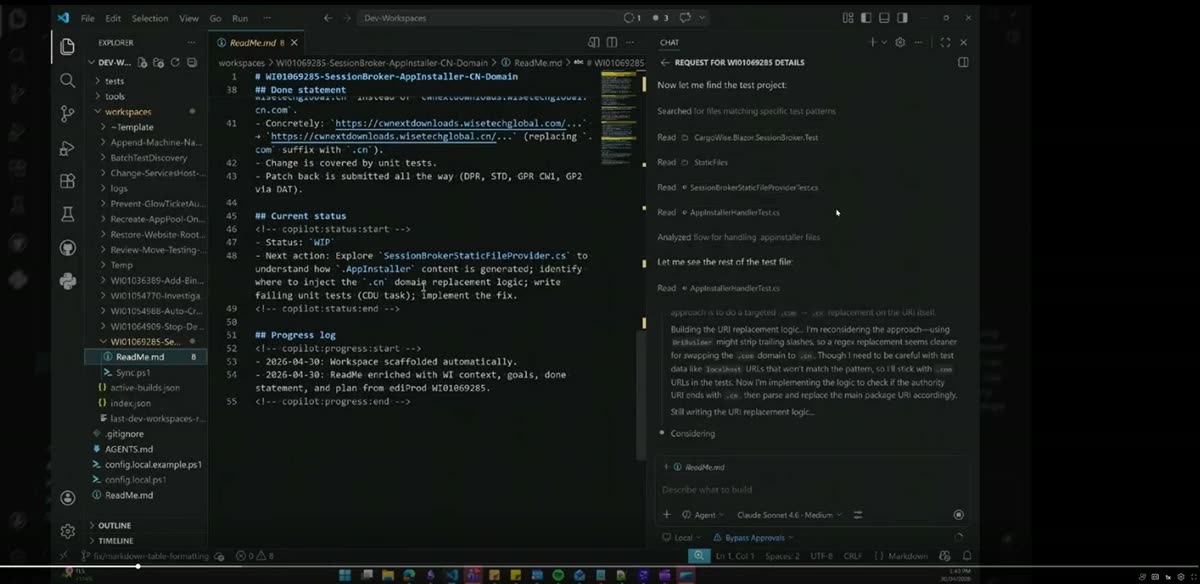
This durable state solves a common limitation of chat-based development: a new conversation does not need to reconstruct the entire history. The developer can resume by work-item number, and the agent can retrieve the latest plan, changes, test context, and outstanding actions from the workspace.
During the demo, the agent used that context to investigate a SessionBroker AppInstaller change, locate relevant tests and implementation files, reason about a .com to .cn domain adjustment, and continue the work without relying only on conversational memory.
5. DAT and Crikey as a Feedback Loop
The workflow treats DAT and Crikey as active feedback sources instead of isolated manual checkpoints. Scripts can submit a build, register monitoring, poll active builds, summarize results, and persist the outcome back into the work-item workspace.
The demo also covered infrastructure failures. When a DAT shell run was rejected, the workflow could cancel blocking tasks, identify the converted build, queue or monitor the replacement, update the workspace, and record the corrected resubmission procedure for future runs.
Feedback-loop pattern:
- Submit the build.
- Register and monitor it in Crikey.
- Summarize the result in durable workspace state.
- Investigate and fix failures.
- Resubmit and continue monitoring.
This creates an auditable loop and allows workflow improvements discovered during one work item to benefit later work.
6. Beyond One Repository
Real work items may span CargoWise, CargoWise.Shared, DevTools, Glow, or other WiseTech repositories. Dev-Workspaces models the work item as the coordinating unit, allowing multiple repositories, branches, worktrees, validations, and pull requests to share one durable context.
This becomes especially valuable when several tasks are active at once. Instead of depending on a single long-running chat, developers can keep separate sessions and workspaces while the repository preserves the state required to resume each task.
7. Roadmap and Discussion
The closing discussion covered extending the workflow model to more repository types, richer functional-test review, broader automation, and safer multi-tasking. The design remains incremental: automate a proven workflow, keep its instructions precise, capture operational feedback, and improve the shared system continuously.
📊 Presentations & Materials
Session Recording
🎥 Watch the May 8, 2026 recording
Recording highlights:
- Work-item setup and continuation pain points
- Human-in-the-loop design principles
- Dev-Workspaces architecture and capability map
- Durable work-item
ReadMe.mdand coding-agent demo - DAT submission, Crikey monitoring, and failure recovery
- Multi-repository and multi-tasking workflows
- Q&A and six-question Kahoot quiz
No standalone presentation files were supplied with the recording. The screenshots above were captured from the session for reference.
🔗 Featured Resources
- Git Worktree Documentation - Manage multiple working trees attached to one repository
- Agent Skills in VS Code - Package reusable instructions, scripts, and resources for coding agents
- GitHub Copilot in VS Code - Overview of agent-assisted development capabilities used in the demonstration
🎮 Quiz Activity
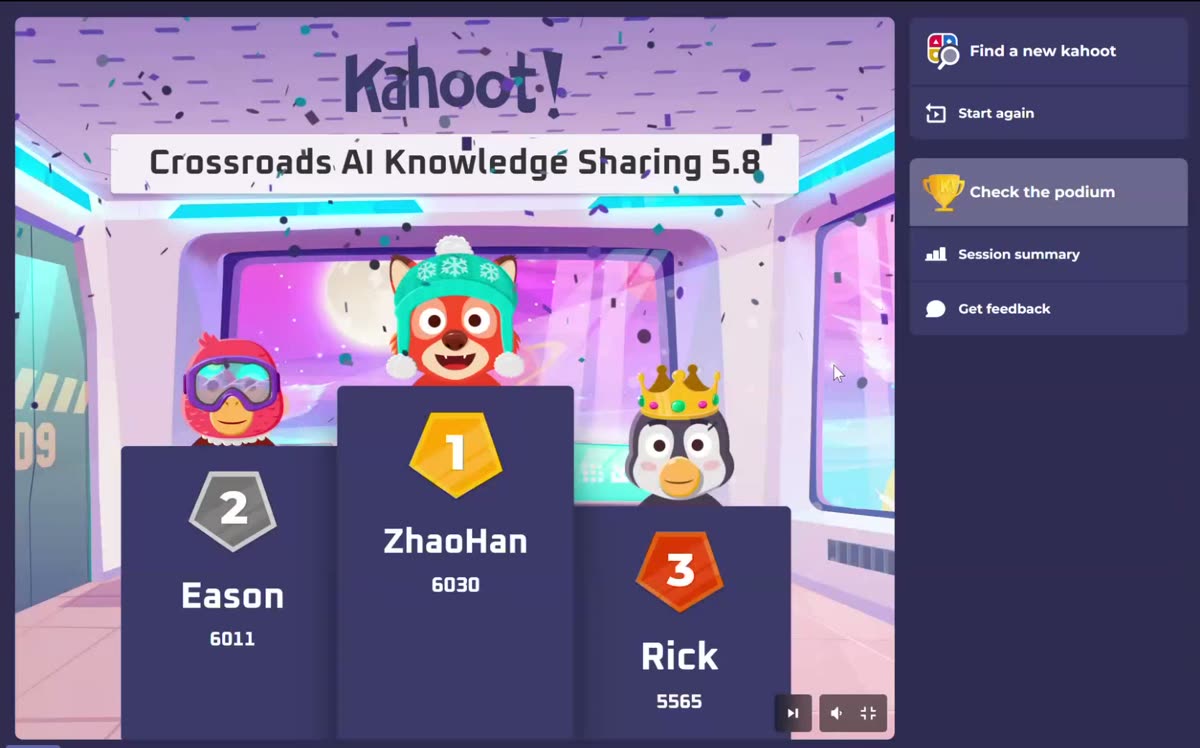
The session ended with a six-question Kahoot quiz joined by approximately 49 players. Questions tested participants' understanding of Dev-Workspaces capabilities and current limitations, QGL behavior, resuming work in a new chat, work-item bootstrap automation, and DAT failure handling.
🏆 Quiz Results & Winners
| Rank | Name | Score | Prize |
|---|---|---|---|
| 🥇 | Zhao Han (ZhaoHan) | 6,030 | 1st-place recognition |
| 🥈 | Eason | 6,011 | 2nd-place recognition |
| 🥉 | Rick | 5,565 | 3rd-place recognition |
🔑 Key Insights
- Protect engineering attention: automate setup and coordination so developers can focus on design and problem-solving.
- Prompts should activate known workflows: scripts and Skills make behavior repeatable, testable, and easier to improve.
- Durable state outlives a chat: work-item context should live in the workspace, not only in conversational history.
- Operational systems are feedback sources: DAT and Crikey results can drive automated monitoring, diagnosis, and resubmission loops.
- The work item coordinates the repositories: multi-repo delivery needs shared context across branches, worktrees, tests, and PRs.
- Humans retain consequential decisions: automation handles mechanics while developers own design, trade-offs, implementation, and validation.
📚 Further Learning
For Developers
- Identify the repeated setup and validation steps around one common work-item type.
- Move deterministic operations into scripts and document their composition in a focused Skill.
- Persist the done statement, status, next action, and progress log outside the chat transcript.
For Teams
- Treat workflow failures as opportunities to improve shared automation and documentation.
- Define clear human-review points before automating more consequential actions.
- Design multi-repository work around a single work-item context and traceable validation record.
🙏 Acknowledgments
Special thanks to:
- Andy Li for presenting and demonstrating Dev-Workspaces
- Aimee Li for hosting and facilitating the session
- All participants for the questions, discussion, and quiz participation
Focus on the problem, not the process
Use prompts to activate precise, repeatable workflows, and keep durable work-item state close to the code.
Keep judgment in the loop
Automate repetitive mechanics, but retain human review for design choices, trade-offs, implementation decisions, and validation.
Session 11 | May 8, 2026 | Dev-Workspaces: Focus on the Problem, Not the Process | Andy Li